
How Google Finds, Crawls & Understands Your Website
A complete, beginner-friendly research guide explaining how Google discovers, crawls, renders, understands and indexes websites—from Search Essentials and helpful content to Googlebot, robots.txt, sitemaps, JavaScript, canonical URLs, mobile-first indexing and technical SEO.
On this page
Mistravora Research Series • Google Search • Part 01
How Google Finds, Crawls & Understands Your Website
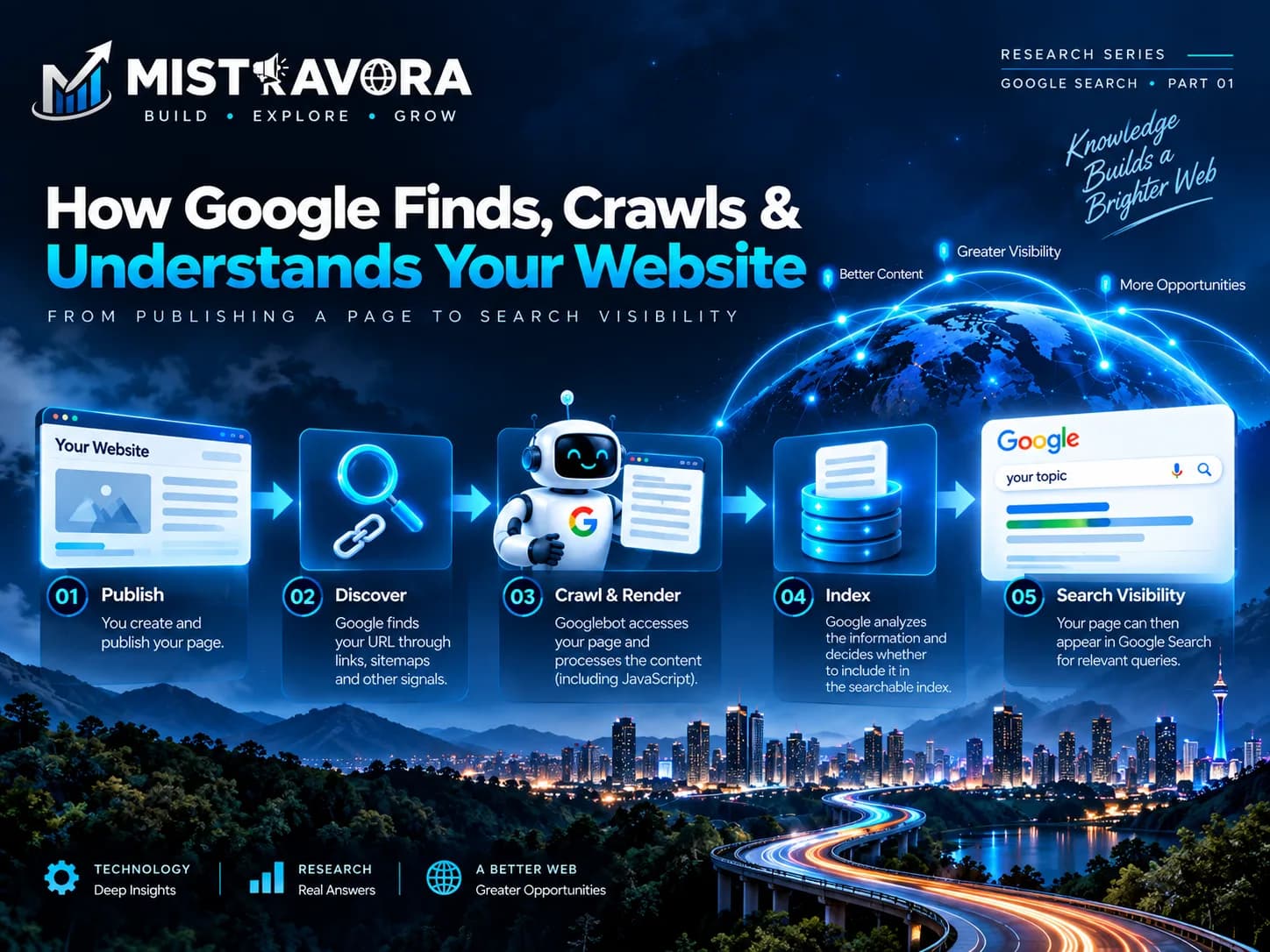
Publishing a website is only the beginning. Before a page can become visible through Google Search, Google must first discover it, access it, process its content, understand its relationship with other pages, and decide whether it should become part of Google's searchable index.
This research explains that complete technical journey in simple language. It covers Google Search fundamentals, discovery, crawling, rendering, indexing, Googlebot, robots.txt, XML sitemaps, crawl management, JavaScript SEO, mobile-first indexing, metadata, canonicalization, redirects, content-removal controls, website migrations, and technical testing.
The goal is not simply to explain individual SEO settings. It is to show how the different systems connect so developers, businesses, marketers, researchers, and website owners can understand what actually happens between publishing a page and making that page eligible to appear in Google Search.
1. Understanding SEO Before Technical Optimization
SEO stands for Search Engine Optimization. At its most practical level, SEO is the process of improving a website so search engines can access and understand its information while also making that information useful to the people searching for it.
SEO is therefore much larger than inserting keywords into pages. A website needs technical accessibility, understandable structure, useful content, clear links, reliable infrastructure, and information that satisfies the purpose for which people are searching.
SEO begins before ranking
Ranking is only one stage of Search. Google cannot rank information it has never discovered or cannot process correctly.
A website can contain excellent information and still experience poor Search visibility when something earlier in the technical process fails.
- Important pages may not have internal links.
- Googlebot may accidentally be blocked.
- The server may repeatedly fail when crawlers request pages.
- The site may generate unnecessary duplicate URLs.
- JavaScript may prevent important information from rendering correctly.
- The wrong canonical URL may be communicated.
- An important page may accidentally contain a
noindexdirective. - The mobile version may contain less important information than the desktop version.
The reverse is also true. A technically perfect website is not automatically useful simply because Google can crawl it.
SEO and paid advertising are different
Paid advertising can purchase advertising placement. It does not purchase a guaranteed organic ranking in Google Search.
Organic Search visibility depends on Google's systems and the information available to those systems.
Does every business need an SEO company?
Not necessarily.
A small website may be successfully maintained by a developer, business owner, or marketing team that understands Search fundamentals.
Large ecommerce platforms, marketplaces, publishers, international websites, and technically complicated applications may benefit from dedicated SEO expertise because the number of URLs, technical systems, and potential failure points becomes much larger.
Be careful with guaranteed rankings
An SEO professional can improve technical implementation, research, content, site structure, monitoring, and Search strategy.
However, an outside consultant or agency does not control Google's organic ranking systems.
Promises that a third party can guarantee a particular organic position should therefore be treated carefully.
2. How Google Search Works
Google uses automated systems to discover, retrieve, process, organize, and serve information from the web.
The real infrastructure is extremely complex, but website owners can understand the basic journey through four major technical stages: discovery, crawling, rendering, and indexing.
2.1 Discovery
Google first needs to become aware that a URL exists.
URLs can be discovered through different mechanisms, including:
- links from pages Google already knows;
- internal website navigation;
- external links from other websites;
- XML sitemaps;
- previous crawling activity;
- and other Google discovery systems.
2.2 Crawling
After discovering a URL, Google may request it using an automated crawler. For normal Google Search crawling, the crawler most people recognize is Googlebot.
When crawling occurs, several technical conditions matter:
- Can Google reach the website's server?
- Does the hostname resolve correctly?
- Does the URL return a valid response?
- Does robots.txt permit crawling?
- Are required resources accessible?
- Does the URL redirect somewhere else?
2.3 Rendering
Modern websites often depend heavily on JavaScript.
The initial HTML returned by the server may therefore not contain everything a visitor eventually sees in the browser.
Google can render supported JavaScript and process the resulting page to understand information that is generated after the original HTML response.
JavaScript itself is not automatically an SEO problem. The important issue is whether the implementation allows Google to access and process important content and links reliably.
2.4 Indexing
After Google processes a page, its systems analyze the information and determine whether that information should become part of Google's searchable index.
This can involve understanding:
- main page content;
- titles and metadata;
- links;
- images and other resources;
- page language;
- duplicate or near-duplicate URLs;
- canonical relationships;
- and other information about the page.
2.5 Serving Search results
When someone performs a search, Google evaluates information from its systems to determine which results may be relevant and useful for that particular query and context.
That ranking and Search-appearance stage is the main subject of Part 2 of this research series.
3. Google Search Essentials
Google Search Essentials provides foundational requirements and guidance for websites that want their content to be eligible to appear in Google Search.
The guidance can be understood through three major areas:
- Technical requirements
- Spam policies
- Key Search best practices
3.1 Technical requirements
Google's minimum technical requirements are relatively simple.
- Googlebot must not be blocked from accessing the page.
- The page needs to work and return an appropriate successful HTTP response.
- The page needs to contain content that Google can index.
Meeting those minimum requirements does not guarantee indexing or ranking. They establish technical eligibility.
3.2 Search best practices
Google's broader guidance encourages website owners to:
- create helpful and reliable content for people;
- use words people naturally use when searching;
- place descriptive wording in important page elements;
- make links crawlable;
- help Google understand images and video;
- follow documented requirements for Search features;
- and avoid unintentionally hiding important content from crawlers.
3.3 Spam policies
Technical accessibility does not mean that every Search optimization method is acceptable.
Google maintains spam policies covering manipulative practices including:
- cloaking;
- doorway abuse;
- expired domain abuse;
- hacked content;
- hidden text and hidden links;
- keyword stuffing;
- link spam;
- machine-generated traffic;
- misleading functionality;
- scaled content abuse;
- scraping used abusively;
- site reputation abuse;
- and other attempts to manipulate Search systems.
4. Building a Search-Friendly Website Architecture
Website architecture describes how pages and sections connect to one another. A clear architecture helps visitors navigate a website and provides crawlers with understandable paths through important content.
4.1 Build a logical hierarchy
Home
├── Services
│   ├── Web Development
│   ├── Mobile Applications
│   └── Digital Marketing
├── Projects
├── Research
│   ├── Google Search Research
│   └── Technology Research
├── About
└── Contact
The exact hierarchy depends on the website, but important information should not be buried unnecessarily.
4.2 Use understandable URLs
URLs should be reasonably descriptive and predictable when possible.
Dynamic parameters are not automatically bad. Ecommerce platforms, search tools, and web applications may legitimately require them.
The larger problem is uncontrolled URL generation that creates many duplicate or low-value combinations.
4.3 Make important links crawlable
Important navigation should expose destinations in a format crawlers can process reliably.
<a href="/services/web-development">
  Web Development
</a>
4.4 Use descriptive anchor text
Anchor text is the visible wording of a link.
Useful anchor text helps people understand where the link will take them.
For example, “Read our JavaScript SEO research” provides more information than “click here.”
4.5 Internal links matter
Internal links connect pages within the same website.
They help visitors discover related information and provide crawlers with paths to other important URLs.
4.6 Avoid important orphan pages
An orphan page is a page with no meaningful internal link pointing to it.
If an important page exists in isolation, visitors and crawlers may have more difficulty discovering it.
4.7 Outbound links
Linking to useful external sources is a normal part of the web.
However, advertisements, sponsorships, paid placements, and certain user-generated links may need appropriate link qualification according to Google's documented guidance.
5. Helpful, Reliable and People-First Content
A technically crawlable page can still be a poor resource.
Google's Search guidance repeatedly emphasizes creating content primarily to help people rather than creating pages mainly to manipulate Search rankings.
5.1 Begin with a real purpose
Before publishing a page, ask:
- Who needs this information?
- What question does it answer?
- What problem does it solve?
- What will the reader understand after reading it?
- Why should this page exist instead of another generic page on the same topic?
5.2 Add original value
Repeating information already available on hundreds of websites does not automatically create a valuable resource.
Original value may come from:
- first-hand experience;
- original research;
- testing;
- real examples;
- data;
- analysis;
- case studies;
- clearer explanations;
- or a useful synthesis of trustworthy primary sources.
5.3 Experience and expertise
When a subject benefits from practical experience or specialist knowledge, readers should have enough information to understand why the author or publisher is a useful source.
5.4 Make authorship clear
For content where readers would reasonably want to know who created the information, clear authorship improves transparency.
5.5 Cite important sources
Research articles should identify important sources rather than presenting other organizations' findings, policies, or documentation as unsupported claims.
When explaining an organization's own technology or policy, its primary documentation should generally take priority over secondary summaries.
5.6 Write naturally
Search queries can help researchers understand how an audience describes a topic.
They should not force unnatural repetition.
Repeatedly inserting the same phrase simply because it is considered a target keyword can reduce readability and can become keyword stuffing.
5.7 Maintain important information
Technology, Search documentation, regulations, products, software, and business information can change.
Important articles should therefore be reviewed when the underlying subject changes.
Simply changing the visible publication date without meaningfully reviewing or updating the information does not make outdated content genuinely fresh.
6. Generative AI and Search Content
Generative AI can significantly reduce the time required for research, organization, drafting, translation, summarization, and editing.
The same technology also makes it extremely easy to produce large amounts of repetitive, inaccurate, or low-value material.
6.1 AI-generated content is not automatically spam
A common oversimplification is: “Google penalizes AI content.”
That does not accurately describe Google's broader Search guidance.
Google's policies focus on the quality and purpose of content and whether automation is being used abusively to manipulate Search.
6.2 Scaled content abuse
Creating large amounts of content primarily to manipulate Search rankings can violate Google's spam policies.
The production method could involve generative AI, scraping, automated transformations, human writers, or combinations of these methods.
6.3 Responsible AI-assisted publishing workflow
- Begin with a genuine user problem, topic, or research question.
- Collect trustworthy sources, prioritizing primary documentation.
- Use AI for research assistance, organization, or drafting where useful.
- Verify important factual claims against original sources.
- Add human analysis, experience, examples, testing, or original findings.
- Remove fabricated, unsupported, or misleading information.
- Edit the final article for accuracy, readability, and usefulness before publication.
6.4 AI should increase productivity, not lower standards
Faster content production should not become an excuse for publishing information that has not been reviewed.
The ability to create thousands of pages quickly makes editorial control more important, not less important.
7. Googlebot and Google's Crawling Infrastructure
Google operates multiple crawlers and fetchers for different products and purposes.
Googlebot is the crawler most commonly associated with Google Search, but administrators should not assume every Google-related request serves the same purpose.
7.1 Googlebot Smartphone
Google documents a smartphone Googlebot user agent.
Because Google uses mobile-first indexing, the information available to the mobile crawler is especially important.
7.2 Googlebot Desktop
Google also documents a desktop Googlebot.
Website administrators may encounter both smartphone and desktop crawler activity.
7.3 Common crawlers
Google maintains common crawlers used across different Google products and services.
7.4 Special-case crawlers
Some crawlers operate for specialized purposes and may follow different crawler-control behavior from ordinary Googlebot Search crawling.
7.5 User-triggered fetchers
Some requests happen because a person initiated an action in a Google product.
These should not automatically be interpreted as ordinary Search crawling.
7.6 Other documented agents
Google also documents agents and fetchers associated with APIs, feeds, and functions such as Read Aloud.
Infrastructure teams should therefore identify the specific agent they are dealing with instead of treating every Google request as Googlebot.
8. Verifying Requests From Google Crawlers
A web request can claim almost any user-agent name.
A malicious crawler could send:
User-Agent: GooglebotThat text alone does not prove that the request actually originated from Google.
Administrators who need to confirm crawler identity should follow Google's documented verification procedures rather than trusting only the visible user-agent string.
Google also documents web-bot authentication mechanisms for supported situations.
9. robots.txt: Controlling Crawler Access
A robots.txt file provides instructions about which areas of a
site participating crawlers may access.
For a normal HTTPS website it is typically available from the root:
https://example.com/robots.txt9.1 Basic robots.txt example
User-agent: *
Disallow: /private-area/

Sitemap: https://example.com/sitemap.xml
9.2 User-agent
The User-agent field identifies which crawler or crawler group a
set of rules applies to.
9.3 Disallow
Disallow identifies paths the matching crawler should not crawl.
9.4 Allow
Allow can permit a more specific path inside an otherwise
disallowed section where supported by the applicable robots.txt behavior.
9.5 Sitemap declaration
A sitemap location can also be declared in robots.txt.
9.6 robots.txt has host-specific scope
A robots.txt file applies to the host from which it is served.
A file on one subdomain should not automatically be assumed to control every other subdomain.
9.7 robots.txt is not security
robots.txt is publicly accessible.
It does not stop a person from opening an otherwise public URL.
Confidential resources need real authentication and authorization.
9.8 Crawling and indexing are different
Blocking crawling does not necessarily guarantee that Google will never know a URL exists.
Google can potentially discover the URL through links or other signals even if its content cannot be crawled.
If an accessible page should not be indexed, Google documents
noindex as the appropriate indexing control.
Google needs to crawl the page to see that directive.
10. Sitemaps and URL Discovery
A sitemap provides information about URLs a website considers important.
It can help Google discover URLs and understand certain information about those resources.
10.1 Basic XML sitemap
<?xml version="1.0" encoding="UTF-8"?>

<urlset
  xmlns="http://www.sitemaps.org/schemas/sitemap/0.9">

  <url>
    <loc>https://example.com/</loc>
  </url>

  <url>
    <loc>https://example.com/research/</loc>
  </url>

</urlset>
10.2 Sitemap indexes
Large websites may require multiple sitemap files.
A sitemap index can reference those individual sitemap files.
10.3 Image sitemaps
Google supports sitemap information that can help provide information about important images.
10.4 Video sitemaps
Video sitemap information can provide additional details about video content on a website.
10.5 News sitemaps
Eligible news publishers can use Google's News sitemap guidance for recent news content.
10.6 Combined sitemap extensions
Supported sitemap extensions can be combined when appropriate.
10.7 lastmod
When <lastmod> is used, it should represent a meaningful
change to the page.
It should not simply be updated every day when the page itself has not meaningfully changed.
10.8 Which URLs should be included?
As a practical implementation principle, sitemap URLs should represent the preferred URLs that the website actually wants Google to consider.
Avoid filling sitemaps with:
- broken URLs;
- redirecting URLs;
- unwanted duplicate versions;
- or pages intentionally prevented from indexing.
11. Asking Google to Recrawl Updated Pages
Google automatically revisits known URLs over time.
However, a website owner may occasionally want Google to reconsider an important URL after a meaningful update.
For individual pages, Google Search Console provides URL Inspection and request-indexing functionality.
For larger groups of URLs, maintaining accurate sitemaps provides a more scalable discovery mechanism.
Submitting a request does not guarantee immediate crawling, indexing, or ranking.
Repeatedly submitting an unchanged page does not create a ranking advantage.
12. Crawl Management and Crawl Budget
Crawling consumes resources on both Google's systems and the website's infrastructure.
Google therefore manages how much crawling occurs.
12.1 Crawl capacity
Google's systems consider how much crawling a host appears able to support without causing infrastructure problems.
12.2 Crawl demand
Google also considers how much it wants to crawl particular URLs.
Not every known URL needs to be requested with the same frequency.
12.3 Improve crawl efficiency
- Maintain reliable hosting and server infrastructure.
- Avoid unnecessary redirect chains.
- Return appropriate HTTP status codes.
- Keep sitemap information accurate.
- Control unnecessary duplicate URL generation.
- Use caching appropriately.
12.4 Reducing crawl activity
If Google crawling is genuinely creating infrastructure problems, Google documents methods for managing crawl activity.
Reducing crawling should solve a real infrastructure problem rather than being used as a routine ranking technique.
12.5 Crawl-budget myths
More Googlebot activity is not automatically better SEO.
The objective is efficient discovery and processing of valuable URLs—not simply maximizing crawler requests.
13. Faceted Navigation and Large URL Spaces
Faceted navigation allows visitors to filter large collections according to attributes such as:
- brand;
- price;
- size;
- color;
- location;
- rating;
- availability;
- or category.
This functionality can be extremely useful for ecommerce websites, marketplaces, property portals, and directories.
The Search challenge is that filter combinations can create enormous numbers of URLs.
/laptops?brand=asus
/laptops?brand=asus&ram=16gb
/laptops?ram=16gb&brand=asus
/laptops?brand=asus&sort=price
/laptops?brand=asus&ram=16gb&page=2
Many of these combinations may represent almost the same underlying collection.
Large websites should therefore make deliberate decisions about which filtered pages provide meaningful Search value and prevent uncontrolled combinations from creating unnecessary crawl spaces.
14. HTTP Status Codes, DNS and Crawling Errors
When Googlebot requests a URL, the web server's response communicates what happened.
| Status | Meaning | Practical Meaning |
|---|---|---|
200 |
Success | The requested resource was successfully served. |
301 |
Permanent Redirect | The resource has permanently moved to another URL. |
302 |
Temporary Redirect | The redirect is presented as temporary. |
404 |
Not Found | The requested resource was not found at that URL. |
410 |
Gone | The resource has intentionally been removed. |
429 |
Too Many Requests | The server is rate-limiting requests. |
5xx |
Server Error | The server failed while attempting to process the request. |
14.1 Soft 404s
A URL can return an HTTP 200 success response while the visible
page behaves like an error page.
For example, a missing product URL may display “Product not found” while the server still reports that the request succeeded.
Search systems can identify situations like this as soft 404s.
14.2 DNS errors
If Google's systems cannot reliably resolve the site's hostname, they cannot reliably reach the website.
14.3 Network errors
Connection failures, timeouts, firewall problems, overloaded infrastructure, and unstable hosting can prevent successful crawling.
Technical SEO troubleshooting may therefore require investigation of the server, CDN, firewall, DNS, or network—not only changes to page content.
15. JavaScript SEO and Rendering
JavaScript powers a large part of the modern web.
Google can process JavaScript, but developers should understand what information is available during each stage of page processing.
15.1 Client-side rendering
With client-side rendering, the initial server response may contain a basic HTML shell.
JavaScript then retrieves information and constructs much of the visible page inside the browser.
15.2 Server-side rendering
Server-side rendering generates useful HTML on the server before the response is delivered to the browser.
15.3 Static generation
Static generation creates HTML ahead of request time.
This can work particularly well for information that does not need to be generated from scratch for every visitor.
15.4 Hydration
Modern frameworks may send pre-rendered HTML and then attach interactive JavaScript behavior after the page loads.
This process is commonly called hydration.
15.5 JavaScript links
Important navigation should expose valid destinations that Google can process.
Standard HTML anchors with meaningful href values provide a
reliable implementation.
15.6 Lazy loading
Lazy loading delays some resources until they are needed.
This can improve performance, but important Search content should not depend on a user interaction that an automated crawler may never perform.
15.7 Test the rendered result
A website that appears correct in a developer's browser can still contain Search problems.
16. Mobile-First Indexing
Google uses the mobile version of website content for indexing and ranking.
This makes the mobile implementation a fundamental Search consideration rather than simply a design consideration.
16.1 Keep important content available on mobile
Do not create a mobile version that removes important information available on desktop.
16.2 Headings and metadata
Important headings, titles, descriptions, and other metadata should be handled appropriately in the mobile experience.
16.3 Images and videos
Important images and video should remain accessible and properly implemented for mobile users and Google.
16.4 Responsive design
Responsive design allows the same URL and page to adapt to different screen sizes.
This can simplify maintenance because the business does not need to maintain a completely separate set of mobile URLs.
17. AMP and Google Search
Google maintains Search documentation for websites that use AMP.
Its documentation covers implementation, validation, and enhancement of AMP content.
AMP is not a universal requirement for appearing in Google Search.
If a website chooses to use AMP, the AMP version, canonical relationships, content, and relevant metadata should be implemented correctly.
For new projects, AMP should be treated as a technical architecture decision based on actual project requirements rather than as a mandatory SEO requirement.
18. Metadata and Indexing Controls
Metadata provides browsers, search systems, and other software with information about a page.
18.1 Robots meta tag
<meta name="robots" content="noindex">
A supported noindex directive tells Google not to index the page.
Google needs access to the page in order to see the directive.
18.2 X-Robots-Tag
Robots directives can also be delivered through HTTP response headers using
X-Robots-Tag.
This can be particularly useful for resources that are not HTML pages.
18.3 Search preview controls
Google supports directives that can influence how much information may be shown in supported Search previews.
These include controls relating to:
- text snippets;
- image previews;
- and video previews.
18.4 Valid metadata
Invalid HTML or unexpected placement can affect how metadata is interpreted.
CMS and framework implementations should therefore generate important metadata consistently.
18.5 Special tags
Google recognizes particular HTML elements and attributes for specific Search purposes.
Developers should follow documented behavior rather than inventing custom markup and assuming Search systems will interpret it in a particular way.
19. Canonicalization and Duplicate URLs
The same or very similar information can sometimes be accessible through multiple URLs.
https://example.com/product
https://example.com/product?ref=homepage
https://www.example.com/product
http://example.com/product
19.1 What is canonicalization?
Canonicalization is the process of selecting a representative URL from a group of duplicate or highly similar pages.
That representative is called the canonical URL.
19.2 Why duplicate URLs appear
- HTTP and HTTPS versions;
- www and non-www hosts;
- tracking parameters;
- filtering and sorting;
- regional variations;
- device-specific implementations;
- CMS-generated URL variations;
- and accidental duplicate routes.
19.3 Canonical signals
Website owners can communicate canonical preferences through mechanisms including:
rel="canonical";- redirects;
- sitemaps;
- and consistent internal linking.
19.4 Canonical declarations are signals
A canonical annotation communicates the site's preferred representative URL.
Google can still select another canonical when its systems determine that another URL is more appropriate.
19.5 Duplicate content is not automatically spam
Duplicate pages often exist for legitimate technical reasons.
Their existence alone does not automatically mean a website is violating Google's spam policies.
19.6 Troubleshooting an unexpected canonical
If Google selects an unexpected canonical, investigate:
- canonical annotations;
- redirects;
- sitemap URLs;
- internal links;
- HTTP and HTTPS versions;
- localization signals;
- and whether the pages actually contain meaningfully different information.
20. Choosing the Correct Search-Control Method
Crawling, indexing, canonicalization, removal, and security solve different problems.
| Goal | Typical Method | Important Limitation |
|---|---|---|
| Control crawler access | robots.txt |
Does not protect confidential information. |
| Prevent indexing | noindex |
Google needs access to the page to see the directive. |
| Move a URL | Redirect | The destination should be relevant to the original resource. |
| Consolidate duplicate URLs | Canonical signals | Google ultimately determines which URL it selects as canonical. |
| Protect private information | Authentication / Authorization | Search directives are not security controls. |
| Remove information from the original source | Delete or restrict the source | Removing a Search result does not automatically delete the source page. |
21. Private, Sensitive and Redacted Information
21.1 Search removal and source removal are different
Removing information from Google Search does not necessarily remove the original information from the website that published it.
When possible, unwanted information should also be removed or restricted at its original source.
21.2 Outdated content
If the source page has already changed but Google Search continues to display old information, Google's processes for refreshing outdated Search information may be relevant.
21.3 Personal information
Google provides removal-request processes for qualifying categories of personal, sensitive, and explicit information.
Depending on the circumstances and applicable policy, this can include qualifying personally identifiable information, doxxing-related content, personal sexual content, and certain exploitative removal practices.
21.4 Content involving minors
Google provides reporting and removal processes for qualifying images involving minors.
Anyone can report child sexual abuse material.
21.5 Legal removal
Separate processes exist for legal requests involving qualifying copyright, trademark, and other legal issues.
21.6 Redaction must actually remove the information
Placing a visible rectangle over confidential text in a document does not always remove the underlying data.
Before publishing a redacted document, verify that the sensitive information has actually been removed from the underlying file.
22. Redirects and URL Changes
Redirects send visitors and crawlers from one URL to another.
22.1 Permanent redirects
Permanent server-side redirects are commonly used when a resource has permanently moved to a new location.
22.2 Temporary redirects
Temporary redirect responses communicate that a move is not intended to be permanent.
22.3 Avoid unnecessary redirect chains
Less efficient:

Old URL
   ↓
Older URL
   ↓
New URL
   ↓
Current URL


Cleaner:

Old URL
   ↓
Current URL
22.4 Redirect to relevant destinations
During a migration, an old URL should normally redirect to its closest relevant replacement.
Redirecting every unrelated old URL to the homepage is generally not a useful migration strategy.
23. Site Moves and Major Website Changes
A website migration can affect crawling, indexing, canonicalization, internal links, and user navigation at the same time.
It should therefore be treated as a planned technical operation rather than a simple design launch.
23.1 Moving infrastructure without changing URLs
A hosting or infrastructure migration can keep the same public URLs while moving the underlying website.
Even when URLs do not change, DNS, server responses, crawling, and performance should be tested carefully.
23.2 Moving with URL changes
Changing domains, protocols, or URL structures requires additional planning.
- Map important old URLs to relevant new URLs.
- Prepare the new site's preferred canonical URLs.
- Update internal links.
- Prepare new sitemap files.
- Implement appropriate redirects.
- Remove temporary development restrictions before launch.
- Test important old and new URLs.
- Monitor crawling and indexing after launch.
23.3 Search systems need processing time
Google needs time to crawl and process migration signals.
Temporary Search fluctuations can occur while systems understand the new website structure.
24. Website Testing, Staging and Temporary Downtime
24.1 Test more than visual design
A website can look perfect to a visitor and still contain serious Search problems.
- Test HTTP responses.
- Review robots.txt.
- Review robots meta directives.
- Test canonical URLs.
- Test redirects.
- Test internal links.
- Validate sitemap URLs.
- Review mobile content.
- Test JavaScript rendering.
- Check important images and other resources.
24.2 Staging websites
A staging environment should not accidentally become a competing public copy of the production website.
Use appropriate access controls during development.
Before production launch, make sure temporary restrictions are not left on the live website.
24.3 Temporarily pausing an online business
If a business temporarily stops operating, removing the entire website for a long period can create unnecessary Search complications.
Where practical, keep useful website information available and clearly communicate temporary operational changes.
When real server downtime is necessary, use an appropriate temporary response and keep the interruption as short as practical.
25. Complete Google Discovery, Crawling & Indexing Checklist
Discovery
- Important pages have meaningful internal links.
- The website has a logical navigation structure.
- An accurate sitemap exists where useful.
- Important pages are not isolated as orphan URLs.
Crawling
- Googlebot can access important URLs.
- robots.txt rules have been reviewed.
- Important CSS and JavaScript resources are accessible.
- The server responds reliably.
HTTP & Infrastructure
- Working pages return successful HTTP responses.
- Missing pages return appropriate error responses.
- Permanent URL moves use appropriate redirects.
- Unnecessary redirect chains have been removed.
- DNS is stable.
- Network and hosting reliability have been reviewed.
URLs & Architecture
- URLs are reasonably descriptive.
- Internal links use preferred URLs.
- Unnecessary parameter combinations are controlled.
- Large faceted-navigation spaces are deliberately managed.
Sitemaps
- Sitemaps contain preferred URLs.
- Broken URLs are removed.
- Redirecting URLs are removed where appropriate.
lastmodrepresents meaningful updates when used.- Large sites use sitemap indexes when required.
Indexing
- Important pages do not contain accidental noindex directives.
- Canonical signals are consistent.
- Duplicate URL patterns are understood.
- Preferred URLs are used consistently in internal links.
Content
- Every important page has a clear purpose.
- Content is created primarily for its intended audience.
- Important research claims are sourced.
- Content adds meaningful value.
- Headings organize the information clearly.
- Anchor text is descriptive.
- Outdated information is reviewed.
Generative AI
- AI-assisted factual information is verified.
- Pages are not mass-produced simply to manipulate Search.
- Human review occurs before publication.
- The final content provides useful value.
JavaScript
- Important content renders correctly.
- Important navigation exposes valid destinations.
- Lazy loading does not hide essential information.
- HTTP responses remain correct.
- The rendered output has been tested.
Mobile
- Important content remains available on mobile.
- Important metadata is available.
- Images and videos remain accessible.
- The mobile experience is usable and readable.
Privacy & Security
- robots.txt is not being used as a security system.
- Private information uses genuine access controls.
- Redacted information is actually removed.
- Search-result removal is not confused with source deletion.
Migrations
- Old URLs are mapped to relevant new URLs.
- Redirects have been tested.
- Internal links use new preferred URLs.
- Canonical annotations use preferred URLs.
- New sitemaps have been prepared.
- Temporary staging restrictions have been removed.
26. Research Findings
The research demonstrates that Google Search visibility does not begin with ranking.
It begins with accessibility and understanding.
Google first needs a route through which it can discover a URL. Its crawler then needs appropriate access. The website's infrastructure needs to respond correctly. Important resources need to be available. JavaScript needs to produce processable information. Indexing directives and canonical signals need to communicate the site's intentions clearly.
Finally, the information itself needs to provide a useful reason to exist.
This means technical SEO and content strategy should not operate as completely separate disciplines.
Developers influence whether information can be discovered, accessed, rendered, and interpreted.
Writers, researchers, businesses, and subject specialists determine whether that information is genuinely useful to the people who need it.
27. Research Sources & Further Reading
This article is an independent Mistravora research synthesis. Official Google documentation is treated as the primary authority for statements about Google Search and Google's crawling infrastructure.
The article explains and organizes those concepts in original language rather than reproducing Google's documentation.
Google Search Essentials & Fundamentals
- Google Search Essentials
- Technical Requirements
- Spam Policies for Google Web Search
- Google SEO Starter Guide
- How Google Search Works
- Creating Helpful, Reliable, People-First Content
- Google Guidance on Generative AI Content
- Get Your Website on Google
- SEO for Developers
- Do You Need an SEO?
- Using Third-Party SEO Services
Crawling, URLs & Sitemaps
- Google Crawling and Indexing Documentation
- Google Indexable File Types
- URL Structure Best Practices
- Make Links Crawlable
- Sitemaps Overview
- Build and Submit a Sitemap
- Manage Large Sitemaps
- Image Sitemaps
- Video Sitemaps
- Google News Sitemaps
- Combine Sitemap Extensions
- Ask Google to Recrawl URLs
- Troubleshoot Crawling Errors
Google Crawlers & Fetchers
- About Google's Crawling Infrastructure
- Overview of Google Crawlers and Fetchers
- Verify Requests From Google Crawlers
- Web Bot Authentication
- Google Common Crawlers
- Google User-Triggered Fetchers
- APIs-Google User Agent
- Feedfetcher
- Read Aloud User Agent
- Googlebot
robots.txt & Crawl Management
- Create a robots.txt File
- Google robots.txt Specification
- Update robots.txt
- Useful robots.txt Rules
- Crawl Budget Management
- Crawling Myths and Facts
- Faceted Navigation
- Reduce Google's Crawl Rate
- HTTP Status Codes
- DNS and Network Errors
JavaScript, Mobile & AMP
- JavaScript SEO Basics
- Fix Search-Related JavaScript Problems
- Lazy-Loading Search-Friendly Content
- Rendering on the Web
- Mobile-First Indexing Best Practices
- AMP on Google Search
- Enhance AMP Content
- Validate AMP Content
Metadata, Canonicalization & Content Controls
- Valid Page Metadata
- Special Tags Google Understands
- Robots Meta Tag and X-Robots-Tag
- Block Search Indexing With noindex
- Qualify Outbound Links
- Control What You Share With Google
- Prevent Images From Appearing in Search
- Keep Redacted Information Out of Google Search
- Canonicalization
- Specify Canonical URLs
- Canonicalization Troubleshooting
Redirects, Site Moves & Testing
- Redirects and Google Search
- Site Move Without URL Changes
- Site Move With URL Changes
- Website Testing and Google Search
- Pause an Online Business
Supporting Practical Sources
Understanding Google Search • Research Series
Next: How Google Ranks Content & Displays Websites in Search
Part 2 moves beyond discovery and indexing to examine ranking systems, ranking updates, AI features, title links, snippets, featured snippets, site names, sitelinks, images, video, Discover, local Search features, page experience, Core Web Vitals, structured data, translated features, regional Search experiences, Web Stories, and other Search appearance systems.
Together, the three articles follow the complete journey: Discovery & Understanding → Ranking & Appearance → Monitoring & Growth.
Want to discuss this research?
We'd love to hear your thoughts or collaborate on future studies.
Get in touch